


You install MC Command Center, load into your save, and nothing shows up. No menu on the computer. No options on Sims. You restart, you re-download, you blame the mod, and you still cannot tell what is wrong.
This MCCC guide for The Sims 4 shows how to install MC Command Center correctly, open every MCCC menu (computer, Sim, mailbox, and console), configure story progression without conflicts, and troubleshoot the LastException caught by MCCC notification. If your game starts stuttering after adding mods, pair this with Hone’s PC lag fixes and FPS stability checklist.
Use MC Command Center In The Sims 4: Start Here
Most MCCC problems come from three issues: wrong install depth, script mods disabled, or overlapping story progression settings. Fix these first and the rest becomes easy.
Critical MC Command Center Setup Checklist
Download The Correct MCCC Version
Always match MC Command Center to your Sims 4 patch. If your game updated today, older script mods can throw errors or fail to load.
Install MCCC One Folder Deep
Put the .ts4script files directly inside Mods\MCCC\. Deeper nesting makes the scripts inert.
Enable Script Mods Allowed
Game Options must allow custom content and script mods. Restart The Sims 4 after turning them on.
Confirm MCCC Loaded In-Game
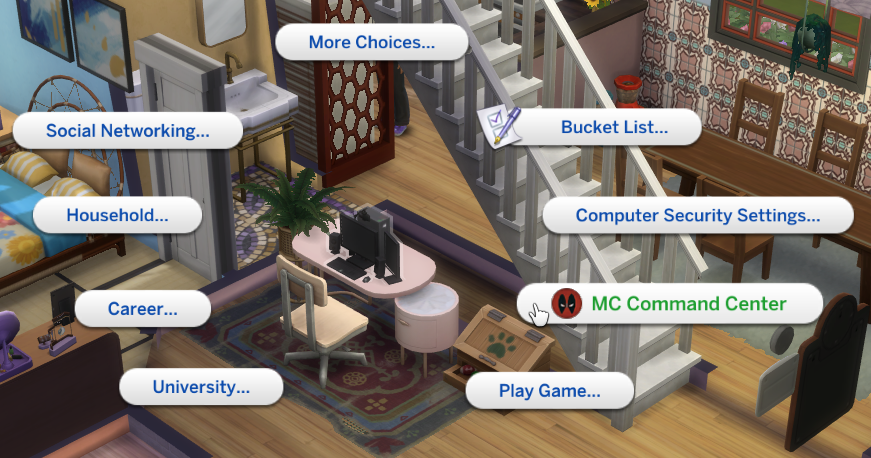
Load a save, click a computer, and look for MC Command Center. If you see it, the script is running.
Install MC Command Center In The Sims 4 Correctly
MCCC installation is easy, but only if you follow the script mod rules. If you treat it like regular CC, the game will not execute the scripts and the menus will never show.
MC Command Center Installation Steps
Follow this exact sequence to avoid the most common MCCC failures
Update MC Command Center Without Losing Settings
MCCC creates configuration files after first launch (your settings live there). If you delete the whole folder every update, you reset everything.
Safe MCCC Update Method
Update the mod files while preserving your configuration
Open The MC Command Center Menu In The Sims 4
MCCC is context-sensitive. Different objects expose different controls. Learn the map and you stop hunting for settings.
Computer Menu For Global MCCC Settings
Sim Menu For Per-Sim MCCC Commands
Mailbox Menu For World And Zone Control
MCCC Console Commands For Advanced Control
Configure MCCC Story Progression In The Sims 4
Story progression in MCCC is mainly driven by MC Pregnancy and supported by MC Population and MC Career. Think of it like this: Pregnancy creates life events, Population keeps the world stable, Career gives townies structure.
- Computer > MC Command Center > MC Pregnancy
- Set eligible ages for marriage and pregnancy
- Tune percentages by age group for realism
- Decide if adoption and risky WooHoo are allowed
- Computer > MC Command Center > MC Population
- Limit homeless Sim generation to reduce save bloat
- Fill empty homes intelligently with move settings
- Use Tray import to spawn curated townies
- Computer > MC Command Center > MC Career
- Set employment ranges so most adults have jobs
- Enable teen school quitting for roleplay saves
- Use career freeze flags for story NPCs
MCCC Vs Neighborhood Stories In The Sims 4
You have two systems that can push the world forward: MCCC and EA Neighborhood Stories. The cleanest setup is picking one system for moves and pregnancies, then disabling overlapping toggles in the other.
MCCC And Neighborhood Stories Feature Comparison
| Feature | MCCC | Neighborhood Stories | Recommended Strategy |
|---|---|---|---|
| Autonomous Marriage | Yes, forms new marriages and households | No, does not create new marriages | Use MCCC for marriage if you want a living world |
| Pregnancy Logic | Percent-based, tunable by age and rules | Toggle-based, less granular | Choose one to prevent double pregnancies |
| Moving And Relocation | Fills homes with more controlled logic | Moves can feel random | Let MCCC handle moving for cleaner neighborhoods |
| Career Changes | Quota-based, stabilizes employment | Random job shifts | MCCC is better if you want consistent schedules |
| Deaths | No, does not randomly kill Sims | Yes, accidental deaths can happen | Enable Neighborhood Stories deaths only if you want chaos |
Best MCCC Modules In The Sims 4 And What They Do
MCCC is modular. You do not need every module enabled to get value. Use the modules that match how you play and how heavy your save is.
- Limit maximum homeless Sims to reduce background generation
- Use Tray import so new townies match your aesthetic
- Flag legacy households as ancestral to preserve iconic homes
- Keep a buffer of empty homes so you can move in later
- Set marriage and pregnancy checks on a schedule you like
- Restrict eligible ages to keep results believable
- Enable parent physical inheritance for better genetics
- Disable elder pregnancy if you want realism
- Prune meaningless acquaintances to reduce save clutter
- Remove specific accessory spam from townies
- Sync glasses across outfits to keep consistency
- Use it after long story progression runs
- Blacklist broken CC or ridiculous base-game items
- Whitelist approved clothing for themed saves
- Copy and paste outfits for clubs and families
- Manage aging changes like facial hair and makeup
- Disable autonomous mean interactions if relationships get ruined
- Stop constant mischief loops in busy households
- Use automation scanning to identify spam interactions
- Lock the fix to the save via tuner settings
- Set multiple skills quickly without console syntax
- Edit friendship and romance for any Sim in the world
- Apply mood buffs for storytelling scenes
- Make Happy when you need to reset a broken day
If Mods Make The Sims 4 Stutter, Fix The PC Too.
Heavy saves can expose weak drivers, background overlays, and unstable frame pacing. If your Sims 4 performance drops after modding, start with Hone’s PC lag guide and FPS drops checklist.
Fix MCCC Not Working In The Sims 4
If MCCC does not show up, do not guess. Use a structured check so you can pinpoint the exact failure point in minutes.
- Confirm Script Mods Allowed is enabled
- Check that .ts4script files are only one folder deep
- Remove duplicates: only one copy of MCCC should exist
- Download the correct MCCC version for your patch
- Find LastException.txt in the Sims 4 folder
- Read the stack trace for mod names or broken interactions
- Update or remove the mod named in the trace
- Keep MCCC updated so it can report cleanly
- Sims 4 updates can auto-disable mods by design
- Re-enable CC and Script Mods in Game Options
- Restart the game after toggling settings
- Then update MCCC to a compatible release
- Reduce homeless Sim generation and relationship bloat
- Avoid stacking multiple story progression mods
- Close overlays and background tools on your PC
- If you see rubberbanding or high latency issues in other games too, fix the network basics
Post-Update MCCC Maintenance Routine For The Sims 4
When The Sims 4 patches, script mods are the first thing that break. Use a routine so you do not destroy a save with outdated code.
After Every Sims 4 Patch
A simple routine that protects your saves and your settings
Conclusion
MC Command Center is the most powerful control layer for The Sims 4 because it changes how the simulation behaves, not just how Sims look. Install it one folder deep, enable Script Mods Allowed, then learn the menu map: computer for global rules, Sims for per-Sim control, mailbox for world utilities, and console commands when you need remote access. For story progression, let MC Pregnancy handle marriage and babies, MC Population handle stability and homeless limits, and MC Career handle job quotas. If you see LastException alerts, treat them as a signal to update or remove the outdated mod named in the trace.
FAQ
What is MC Command Center in The Sims 4
MC Command Center (MCCC) is a script mod framework that adds deep simulation control and story progression. It lets NPC households marry, have children, move, and advance careers based on settings you configure, plus it adds powerful cheat and cleanup tools.
Why is MCCC not showing up in my game
The most common causes are Script Mods Allowed being disabled, the .ts4script files being installed too deep in the Mods folder, or using an MCCC version that does not match your Sims 4 patch. Install to Documents\\Electronic Arts\\The Sims 4\\Mods\\MCCC\\ and restart after enabling script mods.
Where do I put MCCC files in the Mods folder
Place MCCC files one folder deep inside Mods, such as Documents\\Electronic Arts\\The Sims 4\\Mods\\MCCC\\. Script files (.ts4script) will not run if they are nested multiple folders deep.
Can MCCC and Neighborhood Stories run together
Yes, but you should disable overlapping toggles so you do not double-trigger moves or pregnancies. A common setup is using MCCC for marriage and moving, while using Neighborhood Stories only for optional chaos features like accidental deaths.
How do I stop MCCC from making Sims pregnant
Go to a computer, open MC Command Center, then MC Pregnancy. Disable autonomous pregnancy settings or set the percentages to zero for the age groups you want to block. If Neighborhood Stories pregnancy is also enabled, disable it there too so you do not get pregnancies from the other system.
How do I limit homeless Sims using MC Population
Open a computer, select MC Command Center, then MC Population. Use the homeless and population settings to limit how many homeless Sims can exist. This reduces constant random generation and can help keep saves cleaner over time.
What does LastException caught by MCCC mean
It means The Sims 4 generated a LastException error and MCCC detected it and notified you. MCCC is often reporting the problem, not causing it. Check LastException.txt for the stack trace and update or remove the mod mentioned there.
How do I update MCCC without resetting my settings
Do not delete the entire MCCC folder. Drag the new .package and .ts4script files into Mods\\MCCC\\ and choose overwrite. Your configuration files (.cfg) are usually generated by the game and are preserved when you overwrite only the mod files.
Does MCCC improve Sims 4 performance
MCCC can help save health by controlling homeless Sim generation and cleaning bloated relationships, but it also adds extra simulation logic. For best results, avoid stacking multiple story progression mods and keep your world settings balanced. If your PC is already struggling, use system-level fixes like Hone’s computer lag guide.






 Youtube