


Solarpunk lag is not always a graphics preset problem. If the game hitches while flying between islands, feels choppy around a busy base, or shows decent FPS but uneven motion, you need to fix the exact symptom instead of lowering everything at once.
The official Steam page lists Solarpunk as a cozy survival and base-building game with floating islands, co-op, farming, crafting, and exploration. That matters because performance problems can show up during traversal, weather, base loading, or multiplayer hosting, not just in a static benchmark spot.
Do not fix the wrong kind of lag
Solarpunk can feel bad for different reasons. Pick the closest symptom first, then test one fix at a time.
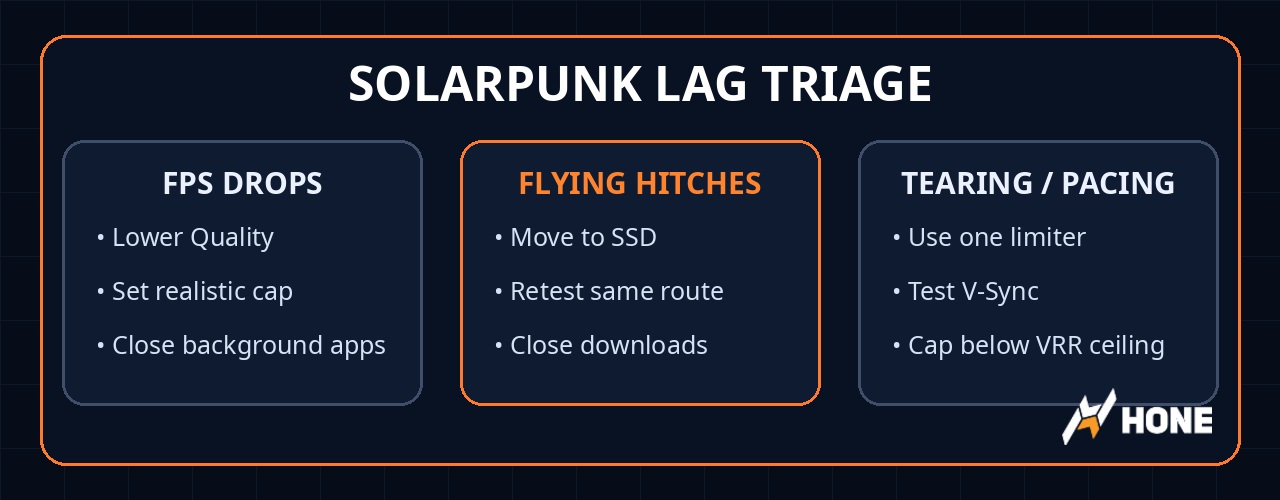
- Lower Quality from High to Medium, or Medium to Low.
- Use a realistic 30, 45, or 60 FPS cap.
- Close overlays and heavy background apps before retesting.
- Move Solarpunk to an SSD if possible.
- Test the same flight path twice after loading a save.
- Close browsers, recordings, downloads, and launchers.
- Test near your busiest base, not an empty island.
- Lower Quality if crops, machines, and decorations cause dips.
- Cap FPS so frame times stop bouncing.
- Try V-Sync On only if you see tearing or uneven pacing.
- VRR users should cap slightly below monitor refresh.
- Use one FPS limiter, not in-game plus driver plus RTSS.
- Plug in and force the dedicated GPU.
- Use a 30 or 45 FPS cap if heat builds up.
- Improve airflow and close background apps.
Quick fix order for Solarpunk lag
- Restart Solarpunk and test the same save or route.
- Update your NVIDIA, AMD, or Intel GPU driver if it is old.
- Verify Solarpunk files in Steam or your launcher.
- Disable overlays and capture tools you do not need.
- Close browsers, launchers, cloud sync, downloads, and recording apps.
- Use one FPS limiter instead of stacking several caps.
- Test Borderless versus Fullscreen if weather or alt-tab behavior feels rough.
- Move Solarpunk to an SSD if flying hitches keep happening.
- Lower Quality to Medium or Low only after the clean baseline test.
- Cap FPS lower if heat, laptop power limits, or frame pacing are the issue.
FPS drops, stutter, or network lag?
Players call all of these problems “lag,” but they need different fixes. Low FPS means your PC is not rendering frames fast enough. Stutter means frames arrive unevenly. A flying hitch usually feels like a short loading stall. Co-op lag can come from the host PC, the host connection, Wi-Fi, or background downloads.
| Symptom | Likely cause | First fix |
|---|---|---|
| Low FPS everywhere | GPU, weak hardware, or too high a preset | Lower Quality, use a realistic cap, and close background apps. |
| Short hitch while flying | Asset streaming, storage, RAM pressure, or background load | Use SSD, close heavy apps, and repeat the same flight route. |
| Busy base feels choppy | Crops, machines, buildings, and decoration density | Cap FPS and lower Quality before blaming your whole PC. |
| Rain or weather feels uneven | Effects load or frame pacing | Try Borderless, then test V-Sync On versus Off. |
| Screen tearing | Sync mismatch | Use V-Sync or a VRR-friendly FPS cap. |
| Co-op rubberbanding | Host/network delay | Test solo, use wired internet, and stop downloads on the host side. |
Test this before changing everything
Build a clean baseline first
Do not change ten settings and guess which one helped. Pick one repeatable route: load your save, walk through your busiest base, fly toward a nearby island, turn the camera through trees and buildings, then repeat that route after each change.
This sounds boring. It also works. Random hitches can make a bad fix look good for one test, especially in a game that streams floating islands and base detail. A repeatable route gives you cleaner feedback.
Use one FPS limiter
Average FPS can lie. If Solarpunk says 70 FPS but still feels choppy, the problem may be frame pacing or 1% lows, not the average number. A stable 60 can feel better than a jumpy 80.
Start with the in-game FPS cap if Solarpunk gives you one and it feels smooth. If the in-game cap is missing or pacing still feels off, try a driver cap or RTSS. Keep the other caps disabled while testing.
For G-Sync, FreeSync, or Adaptive Sync monitors, cap slightly below your refresh ceiling when you want capped tear-free play. On a 144 Hz display, that usually means a cap just under 144 rather than exactly 144.
Fix flying and island-streaming hitches
Flying between islands is the most Solarpunk-specific stutter test. If the game pauses for a split second when new land, buildings, or vegetation load in, the issue may be asset streaming rather than normal low FPS.
Move Solarpunk to an SSD if it is installed on an HDD. Keep some free space on the drive, close browsers and recording tools, and stop downloads before testing. An SSD will not guarantee higher average FPS, but it can reduce loading and streaming stalls.
Run the same flight path twice. The first pass may load or cache new assets. The second pass tells you more about whether the fix actually helped.
Fix base-area stutter
Solarpunk is a base-building game, so your smoothest empty island is not the real test. Crops, machines, decorations, storage, and co-op activity can all make a busy base heavier than the early game.
If your base area feels choppy, set a stable FPS cap first. Then lower Quality from High to Medium, or from Medium to Low if your PC is below the minimum spec. Avoid expanding a huge base while troubleshooting or you will keep moving the target.
If you need the full settings table, use the Solarpunk best settings guide. This article is the fix path, not a second copy of the same settings list.
Fix rain, weather, and screen tearing
Weather can expose uneven frame pacing. Test Borderless first if Fullscreen starts to feel rough when rain or effects appear. Fullscreen may still work better on some PCs, so treat this as a test, not a law.
Start with V-Sync Off. Turn it On if you see tearing or if motion feels uneven in a way a stable FPS cap does not fix. If input feels heavy after enabling it, turn it back Off and use a cleaner cap or VRR setup.
Laptop-specific Solarpunk lag fixes
If Solarpunk runs well for ten minutes and then gets worse, check heat and power before chasing config files. Laptops often drop clocks when the GPU or CPU gets hot.
Plug in, use a performance power mode, and force Solarpunk to use the dedicated GPU in Windows Graphics settings or your NVIDIA/AMD control panel. If fans ramp up and FPS still drops over time, use a 30 or 45 FPS cap and improve airflow.
Do not confuse thermal throttling with a bad graphics preset. Lower settings can reduce heat, but blocked vents, weak cooling, or battery mode need direct fixes.
When to verify files or update drivers
Verify game files if stutter started after a patch, crash, failed update, or mod/config experiment. It is a safe reset before you start deleting folders or changing config files.
Driver updates are worth doing if your GPU driver is old, especially near a new game launch. Do not expect a driver update to magically double FPS, but it can fix crashes, shader issues, or game-specific bugs.
Should you edit Solarpunk config files?
PCGamingWiki lists Solarpunk as an Unreal Engine 5 game and shows Windows config files under the game folder path for Solarpunk\Saved\Config\Windows. That is useful for advanced troubleshooting, but it should not be your first fix.
Back up files before changing anything. Do not paste random Engine.ini packs, delete save folders, or stack unknown config tweaks from comment sections. Start with normal settings, storage, overlays, drivers, file verification, and one clean FPS limiter.
What not to do first
- Avoid Realtime process priority.
- Skip random FPS boost packs or DLLs.
- Use one FPS cap instead of stacking several.
- Keep antivirus enabled; close active scans only while testing if needed.
- Back up config or save folders before touching them.
- Change one setting at a time so the test means something.
Clean up the PC side too
Solarpunk can still hitch if overlays, startup apps, capture tools, and background processes are stealing resources. Hone helps reduce that PC-side drag before you launch the game.
Try Hone freeFAQ
Why does Solarpunk stutter when flying between islands?
Flying hitches usually point to asset streaming, storage, or background load. Move the game to an SSD if possible, close heavy apps, and test the same flight path twice before judging the fix.
Why does Solarpunk lag even when my FPS looks high?
Average FPS can hide frame-time spikes. A few slow frames can feel like stutter even when the FPS counter looks fine.
Should I use V-Sync in Solarpunk?
Start with V-Sync Off. Turn it On only if you see tearing or uneven pacing. If you use VRR, cap slightly below your monitor refresh range.
What is the fastest Solarpunk stutter fix?
Disable overlays, close background apps, update GPU drivers, verify files, use one FPS limiter, and retest the same base or flight route.
Does lowering graphics fix Solarpunk stutter?
It can fix GPU-limited FPS drops, but flying hitches may need SSD, RAM, background app, or frame pacing fixes instead.
Why does Solarpunk run worse on my laptop after a few minutes?
That usually points to heat or power limits. Plug in, force the dedicated GPU, improve airflow, and use a stable 30, 45, or 60 FPS cap.





 Youtube